


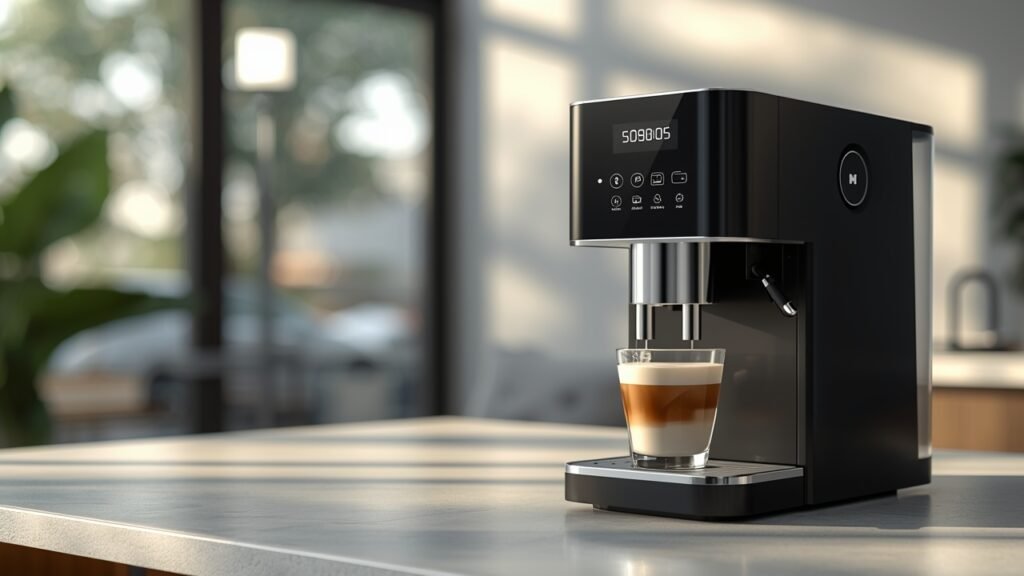
Imagine waking up, still groggy, and with a simple command, your perfect cup of coffee begins brewing without you even lifting a finger. This isn’t a scene from a futuristic movie; it’s the present reality, thanks to advancements in smart home technology. For entrepreneurs, remote workers, and busy professionals, the integration of automation into daily routines isn’t just a luxury; it’s a strategic move to reclaim precious time and boost productivity.
Table of Contents
The rise of sophisticated appliances means even our morning ritual can be streamlined. Specifically, the innovation behind Smart voice-activated coffee machines represents a significant leap forward, transforming how we interact with our kitchens and kickstart our workday. These devices are more than just brewers; they are intelligent companions that seamlessly fit into the ecosystem of Smart Home Appliances, offering unparalleled convenience and efficiency.
Tools & Requirements
To integrate a smart, voice-activated coffee machine into your digital workflow, you’ll need a few essential components and platforms. The core requirement is, of course, a compatible smart coffee machine. Brands like Breville, De’Longhi, and Keurig now offer models with Wi-Fi connectivity and voice assistant integration. Beyond the hardware, here’s what you’ll typically need:
- A Reliable Wi-Fi Network: Essential for connecting your smart appliance to the internet and your home network.
- Smartphone or Tablet: For installing and managing the manufacturer’s companion app. This app is crucial for initial setup, scheduling, and often provides features not available via voice commands alone.
- Voice Assistant Ecosystem: An existing smart speaker or display, such as Amazon Echo (Alexa) or Google Home (Google Assistant). Apple HomeKit compatibility is also growing, though less common for coffee machines currently.
- Manufacturer’s Smart Home App: Each brand will have its proprietary application (e.g., Breville Home Connect, Keurig App) that facilitates pairing, customization, and firmware updates.
- Integration with Voice Assistant App: You’ll need to enable the coffee machine’s “skill” (Alexa) or “action” (Google Assistant) within your respective voice assistant app.
- Optional: Smart Plugs (for non-smart machines): While not truly voice-activated brewing, a heavy-duty smart plug can turn a standard coffee maker on/off via voice, provided the machine’s physical switch remains “on” and it resumes brewing when powered. This is a workaround, not a true smart solution.
Setup & Implementation Timeline

The initial setup for a voice-activated coffee machine is surprisingly straightforward, typically taking no more than 15-30 minutes. The learning curve is minimal for anyone already familiar with connecting smart devices. You can usually expect to see immediate results in terms of convenience and automation.
- Unboxing & Physical Placement (5-10 minutes): Setting up the machine on your counter, filling the water reservoir, and adding beans/pods.
- App Installation & Wi-Fi Connection (5-10 minutes): Downloading the manufacturer’s app, creating an account, and connecting the machine to your home Wi-Fi. This usually involves following on-screen prompts.
- Voice Assistant Integration (5-10 minutes): Linking the coffee machine’s skill/action within your Alexa or Google Home app. This step is critical for enabling voice commands.
- Personalization & Scheduling (5-15 minutes): Customizing brew strengths, temperatures, and setting up daily schedules through the app.
Once set up, the long-term benefits of automated brewing are instantaneous. You’ll immediately feel the impact of hands-free operation and scheduled coffee on your morning routine.
Step-by-Step Implementation Guide


Integrating a smart coffee machine into your entrepreneurial workflow is a simple, yet impactful process. Follow these steps to unlock the full potential of your new brewing companion:
- Unbox and Prepare Your Machine: Place the machine in its desired location, plug it in, fill the water tank, and add your preferred coffee beans or pods. Ensure any internal filters are properly installed as per the manufacturer’s instructions.
- Download the Manufacturer’s App: Search for the official app (e.g., “Breville Home Connect,” “Keurig App”) in your smartphone’s app store. Install it and create a user account.
- Connect to Wi-Fi: Open the app and follow the on-screen instructions to connect your coffee machine to your home or office Wi-Fi network. This often involves putting the machine into a “pairing mode” and entering your Wi-Fi credentials into the app. Ensure your network is 2.4GHz compatible, as many smart devices still prefer this band.
- Integrate with Your Voice Assistant:
- For Alexa: Open the Alexa app, navigate to “Skills & Games,” search for your coffee machine’s brand skill, and enable it. You’ll likely need to link your manufacturer’s account. Then, ask Alexa to “Discover Devices.”
- For Google Assistant: Open the Google Home app, tap the ‘+’ icon, select “Set up device,” then “Works with Google.” Search for your coffee machine’s brand, link your account, and assign it to a room if prompted.
- Customize and Schedule: Use the manufacturer’s app to set preferences like brew strength, cup size, and temperature. Crucially, set up a daily brewing schedule. Imagine your coffee starting five minutes before your alarm, ensuring it’s fresh and ready right when you are.
- Test Voice Commands: Once integrated, test it out! Try commands like, “Alexa, brew coffee,” or “Hey Google, make me a large americano.” Experiment with different commands to understand your machine’s capabilities.
By following these steps, you’ll not only have a perfectly brewed cup of coffee on demand but also integrate your Smart voice-activated coffee machines into a larger ecosystem of Smart Home Appliances, enhancing your daily productivity.
Key Benefits & Business Impact
For entrepreneurs, freelancers, and online businesses, every minute counts. Integrating smart kitchen tech, particularly a Smart voice-activated coffee machines, offers tangible benefits beyond just a good cup of joe:
- Time Efficiency & Productivity Gains: Eliminate the manual steps of brewing. Voice commands or schedules mean your coffee is ready precisely when you are, allowing you to focus on high-value tasks from the moment you wake or step into your office. This small time-saver compounds daily.
- Enhanced Focus & Reduced Decision Fatigue: Automating a routine task like coffee preparation frees up mental bandwidth. Less cognitive load on mundane activities means more energy for critical business decisions and creative problem-solving.
- Consistent Quality: Smart machines often offer precise control over brewing parameters (temperature, strength, volume), ensuring a consistently perfect cup every time. This consistency can be surprisingly beneficial for maintaining routine and comfort during demanding workdays.
- Modern Office Ambiance: For client-facing freelancers or small businesses, a voice-controlled coffee setup projects a tech-savvy and modern image. It subtly communicates efficiency and a forward-thinking approach.
- Seamless Smart Home Integration: These devices fit perfectly into a broader ecosystem of Smart Home Appliances. Imagine pairing your coffee machine’s schedule with your smart lights, waking up to a gently lit room and the aroma of freshly brewed coffee. This creates a highly optimized and stress-reducing start to the day.
- Scalability (Indirect): While not directly scalable in a business sense, the principle of automating repetitive personal tasks frees up mental and physical resources that can then be directed towards scaling business operations.
Advanced Tips, Alternatives, or Optimization Strategies
To truly maximize the utility of your smart brewing setup, consider these advanced strategies:
- Routine Automation: Beyond simple scheduling, integrate your coffee machine into broader smart home routines. For instance, an “Evening Prep” routine could include refilling the machine’s water, grinding beans, and setting a morning brew. A “Workday Start” routine could trigger your machine along with turning on office lights and opening your preferred news briefing.
- Voice Command Customization: Most voice assistants allow you to create custom phrases or “shortcuts” for commands. Instead of “Alexa, tell [coffee machine name] to brew,” you could set up a shortcut “Alexa, good morning coffee” to initiate a specific brew.
- Sensor Integration: Pair your coffee machine with presence detection sensors. Imagine your coffee starting to brew only when a motion sensor detects you entering the kitchen, or when your phone disconnects from sleep mode. This adds a layer of intelligent responsiveness.
- Monitoring & Maintenance Reminders: Use the companion app to monitor usage patterns. Some advanced machines can alert you when the water reservoir is low or if descaling is needed, ensuring optimal performance and longevity.
- Free vs. Paid Tools: While the core functionality comes with the machine, consider paid smart home hubs like Home Assistant for deeper, more complex automations that integrate devices from various manufacturers. For basic routines, free voice assistant apps are usually sufficient.
Common Mistakes to Avoid

While convenient, smart coffee machines can sometimes lead to minor frustrations if common pitfalls aren’t avoided:
- Forgetting to Refill Water or Coffee: The most common oversight. A voice command to brew will fail if the machine is empty. Always make it a habit to refill the water tank and coffee grounds/pods the evening before, or immediately after brewing your last cup.
- Unstable Wi-Fi Connection: A weak or intermittent Wi-Fi signal will cause the machine to disconnect, rendering voice commands useless. Ensure your router is placed optimally and consider a mesh Wi-Fi system if you have dead zones.
- Incorrect Voice Assistant Setup: Not properly enabling the skill/action or linking accounts will prevent voice control. Double-check all steps in the voice assistant app during setup.
- Over-reliance on Voice: While convenient, sometimes a quick tap on the app or a physical button is faster, especially for minor adjustments or when privacy is a concern. Don’t neglect other interaction methods.
- Ignoring Firmware Updates: Manufacturers frequently release updates to improve connectivity, add features, and fix bugs. Always ensure your machine’s firmware is up to date via its companion app.
- Using a Standard Smart Plug for True Automation: As mentioned, a smart plug can only turn a basic coffee maker on/off. It won’t pre-grind, select brew strength, or perform advanced functions. For true voice-activated brewing, invest in a purpose-built smart machine.
Maintenance, Updates & Long-Term Optimization
To ensure your smart coffee machine continues to deliver peak performance and convenience, consistent maintenance and optimization are key:
- Regular Cleaning: Follow the manufacturer’s cleaning schedule for descaling, cleaning brew heads, and drip trays. Neglecting this impacts coffee quality and machine longevity.
- Firmware & App Updates: Periodically check the manufacturer’s app for firmware updates for the coffee machine itself, and ensure the app on your smartphone is also up-to-date. These updates often bring performance improvements, bug fixes, and new features.
- Network Health Monitoring: Keep an eye on your home network’s health. If other smart devices are experiencing connectivity issues, your coffee machine might too. Reboot your router occasionally, and ensure no network settings are inadvertently blocking the device.
- Voice Assistant Updates: The underlying voice assistant platforms (Alexa, Google Assistant) also receive frequent updates. Ensure your smart speakers are running the latest software for optimal command recognition and responsiveness.
- Personalized Optimization: As your coffee preferences or daily routine evolves, don’t hesitate to adjust schedules or custom commands in the app. The beauty of smart devices is their adaptability.
- Security Best Practices: Use strong, unique passwords for your manufacturer’s app account. Keep your Wi-Fi network secure to protect all your connected devices from potential vulnerabilities.
Conclusion
In the fast-paced world of online business and entrepreneurship, optimizing every aspect of your day is paramount. While seemingly small, integrating technologies like Smart voice-activated coffee machines can free up precious mental and physical resources, allowing you to dedicate more energy to strategic tasks. Beyond the sheer convenience, these devices offer consistent quality, contribute to a modern workspace aesthetic, and seamlessly integrate into a connected digital lifestyle.
By adopting such Smart Home Appliances, you’re not just brewing coffee; you’re investing in a smarter, more efficient, and ultimately more productive version of your daily routine. We encourage you to explore these innovations and experience firsthand how a small change in your morning ritual can make a significant impact on your overall business efficiency.
FAQs
Q: Are voice-activated coffee machines compatible with all smart home systems?
A: Most smart coffee machines primarily integrate with Amazon Alexa and Google Assistant, which are the dominant voice assistant platforms. Some newer models may offer Apple HomeKit compatibility, but it’s less common. Always check the product specifications for exact compatibility.
Q: Can I schedule my coffee to brew at a specific time?
A: Yes, absolutely. A core feature of nearly all smart coffee machines is the ability to schedule brewing times through their companion app. This allows you to have your coffee ready exactly when you want it, every day.
Q: What happens if my Wi-Fi goes down?
A: If your Wi-Fi network goes down, the machine will lose its smart functionality. You won’t be able to use voice commands or the mobile app. However, most machines will still operate manually using their physical buttons.
Q: Do these machines use more electricity than standard coffee makers?
A: While they consume a minimal amount of power to maintain Wi-Fi connectivity and standby mode, the overall energy consumption is generally comparable to traditional programmable coffee makers. The difference is usually negligible in terms of overall electricity bills.
Q: Is it necessary to use specific coffee pods or beans?
A: This depends on the specific machine. Some are designed for ground coffee, others for specific pod systems (like Keurig K-Cups or Nespresso capsules). Always check the machine’s specifications to ensure you purchase the correct type of coffee for your model.